Noticeboard, Message Thread or Handout? Choosing a Channel for Group Updates
Choose a channel for group updates by matching noticeboards, message threads and handouts to how neighbours find details, revisit them and respond.
A neighbor sees a handwritten notice beside the mailboxes, then checks a phone thread for a changed meeting room. The details may be simple, but finding the latest version is not. Choosing a channel for group updates works best when you ask what people need to do with the information: notice it, return to it, or answer it.
Noticeboards, message threads and handouts each suit a different kind of attention. Compare them by findability, revisitability and response—not by assuming one format should carry every update.
1. Use a noticeboard when the update needs to be noticed
A noticeboard is useful when people pass the same physical place as part of an ordinary routine: an entrance, laundry room, shared workshop or community room. It can reach someone who is not in a group chat and does not regularly check email. A clear heading and a few well-spaced details can make an invitation visible without requiring anyone to search for it.
Its strength is passive discovery. A neighbor may notice a planned clean-up while collecting mail, even if the event had not been on their mind. That makes the board a good home for broad announcements, recurring activities and information that remains useful for a while.
Its weakness is that it depends on place and upkeep. People who rarely use that entrance may never see the notice, and an old sheet can look current if nobody removes it. Give each notice a clear date, a contact method and, when relevant, a date after which it should come down. Use large, legible lettering and put the main point near the top.
A noticeboard is less suitable for a fast exchange. A reader cannot easily ask a question in the margin, and a correction may not reach anyone who already read the first version. If a detail changes, replace the notice rather than adding a small handwritten amendment that could be missed.
2. Use a message thread when people need to respond
A group text or messaging thread is handy for coordination that depends on replies: confirming who can bring supplies, asking which entrance is open, or alerting people that a gathering has moved indoors. It places questions and answers in one shared conversation, so a participant can respond without finding the organizer in person.
Threads can also become hard to search. A new message pushes earlier details upward, and a side conversation can bury the time or location. Pin the current announcement if the service allows it, or repost a concise update when the plan changes. Include the date, place, action needed and a contact for anyone who cannot use the thread.
Be thoughtful about access. Not every neighbor uses the same app, wants notifications, or feels comfortable sharing a phone number. Avoid treating silence as consent or as proof that someone did not care. Offer a way to respond privately or through another channel, especially when a decision affects shared space or resources.
For a thread to stay readable, keep the announcement separate from discussion when possible. One organizer can post the current details, while replies handle questions. If a decision is made, post its outcome plainly instead of expecting readers to reconstruct it from several messages.
3. Use a handout when people need something to keep
A handout works well when the information has several parts or will be useful away from the place where it was shared. A small sheet can carry a schedule, a map, a list of what to bring, or contact details for a local resource. Unlike a noticeboard, it travels with the reader; unlike a thread, its contents do not shift as new replies arrive.
That permanence is useful only if the handout is current and easy to scan. Put the purpose first, group related details together and give a clear route for questions. If the paper includes a web address or QR code, also write a readable contact option for people who do not want to use a phone camera.
Handouts can be wasteful when the information is brief, temporary or likely to change. They also require someone to distribute them, and recipients may misplace them. Use a handout when people are likely to consult the details later, not simply because printing feels more official.
4. Match the channel to what readers must do
Before sending an update, identify its main job. Does a person need to see it once, keep it handy, or reply? The answer points toward the format, while the audience and setting help you decide whether a second route is needed.
- For a general invitation: Put a notice on a familiar board, with the date, place and a contact route. Add a thread post if many invitees already use it.
- For a changing plan: Use a message thread for the exchange, then replace any physical notice that now gives the wrong details.
- For instructions to use later: Offer a handout with the information in a stable, scannable order.
- For a choice that needs replies: State the question and the acceptable ways to answer. A board alone is not a response channel.
- For neighbors with different access habits: Use one primary channel and a simple alternative, rather than scattering partial information across many places.
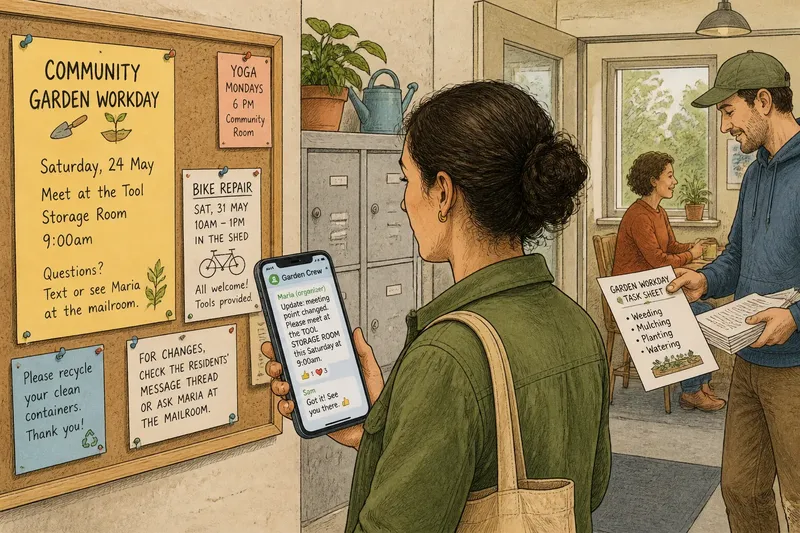
Say a block group is arranging a shared garden workday, and the tool-storage room has changed. Imagine the organizer posts the new meeting point in the active message thread, replaces the old notice beside the entrance, and gives a one-page task sheet to people who will be working around the garden. Readers can find the current location quickly, while the handout carries the slower-moving task details.
5. Keep one version clearly current
Using more than one channel can widen access, but it creates a version problem. A neighbor may see one location on a printed sheet and another in a thread. Choose which channel carries changes, then make that route obvious wherever the update appears.
For example, a notice can say, “For changes, check the residents’ message thread or ask the organizer at the mailroom.” A handout can name the person or place to contact if its details become outdated. The aim is not to force everyone online; it is to make the path to current information plain.
When replacing an update, remove or mark the old copy. In a thread, post a new message that states what changed instead of relying on readers to notice an edited line. Keep the original context brief enough that someone arriving late can understand the update without reading the entire conversation.
6. What should you ask before choosing a channel?
Which channel is easiest for someone to notice?
Think about where the intended readers already look during an ordinary day. A noticeboard helps only if people pass it; a thread helps only if they can access and check it.
How will readers find the details again?
If they need to consult instructions later, a handout or a clearly pinned message may be easier than a rapidly moving conversation. Keep the title specific so the information is recognizable when someone returns to it.
Do readers need to answer or ask a question?
Use a format that allows a reply, and say what kind of response is useful. If people may prefer not to reply publicly, include a private contact route.
What happens if the information changes?
Choose a clear way to update the current version and remove obsolete copies where you can. If changes are likely, avoid making a fixed handout the sole source of details.
7. What is not worth the effort?
It is usually not worth copying every short message onto every surface, or designing a polished handout for details that may change by the next day. More copies can create more stale versions, while elaborate formatting can distract from the date, place and action readers actually need.
Likewise, do not add a new app simply to make a simple announcement feel organized. If a paper notice and a familiar thread already reach the people involved, keep the system understandable. Make extra work only when it solves a real access or response problem.
For choosing a channel for group updates, the most useful question is not which format looks most official. It is whether a neighbor can spot the message, return to the right details and respond in a way that fits the situation. A short update with a visible date and a clear next action will usually serve better than a polished message whose current version is hard to find.